Sales Teams
CRM for Sales Teams and Sales Managers
Share leads fairly, see who owns each one, check that follow-ups happen and coach from real numbers, without a heavy CRM rollout.
The short answer
What should a CRM for sales teams do?
A CRM for sales teams should share new leads fairly, show who owns each one, make follow-up visible to the manager and report on each rep's results. AliveCRM does this for sales teams of 2 to 50, so a manager can run the team from one screen instead of chasing updates in chats and spreadsheets.
When a team grows past two or three people, the questions change. It is no longer "did we get leads?" but "who has them, did they call, and why is one rep converting twice as many as another?"
Problems sales managers bring to us
- Some reps get the best leads and others get none.
- Leads sit with someone on leave and nobody notices.
- Follow-up happens in personal phones and nobody can check it.
- Weekly reviews depend on what reps say, not on data.
How It Works
How a Lead Moves Through Your Team
The manager can see every step.
Share
Share Leads Fairly Across the Team
With auto-assignment on the Basic plan and above, set a rule per submission type: round-robin, least busy, random or a fixed owner. The pool can be the team on each product, project or service, so leads go to the people who sell it.
- Round-robin, least busy, random or fixed
- A team per product, project or service
- Reassign when a rep is away
Rahul Sharma
Example Technologies
Own
Clear Ownership and the Right Visibility
Every lead shows its owner. Give reps a role with "self only" visibility so they work their own list, while managers and admins see the whole pipeline. Roles control who can edit, export or delete, and 2FA protects every login.
- Owner on every lead
- "Self only" lists for reps
- Role-based permissions and 2FA
Rahul Sharma
Example Technologies
Check
Follow-Up You Can Check
Reps set a reminder (Basic and above) for the next step, and overdue reminders are counted on the dashboard. A response timer on each new lead turns orange at 15 minutes and red at 30. Calls and WhatsApp taps from the lead are logged in its Contact History.
- Overdue count on the dashboard
- Response timer on every lead
- Contact History per lead
Rahul Sharma
Example Technologies
Coach
Coach From Real Numbers
On Advance and Premium, Sales Rep Performance ranks reps on leads assigned, won and average response, and Follow-up Compliance shows who keeps their reminders. The Conversion Funnel shows where each stage loses deals. The Lead Pipeline report is on every plan.
- Rep leaderboard
- Follow-up compliance per rep
- Stage-to-stage conversion funnel
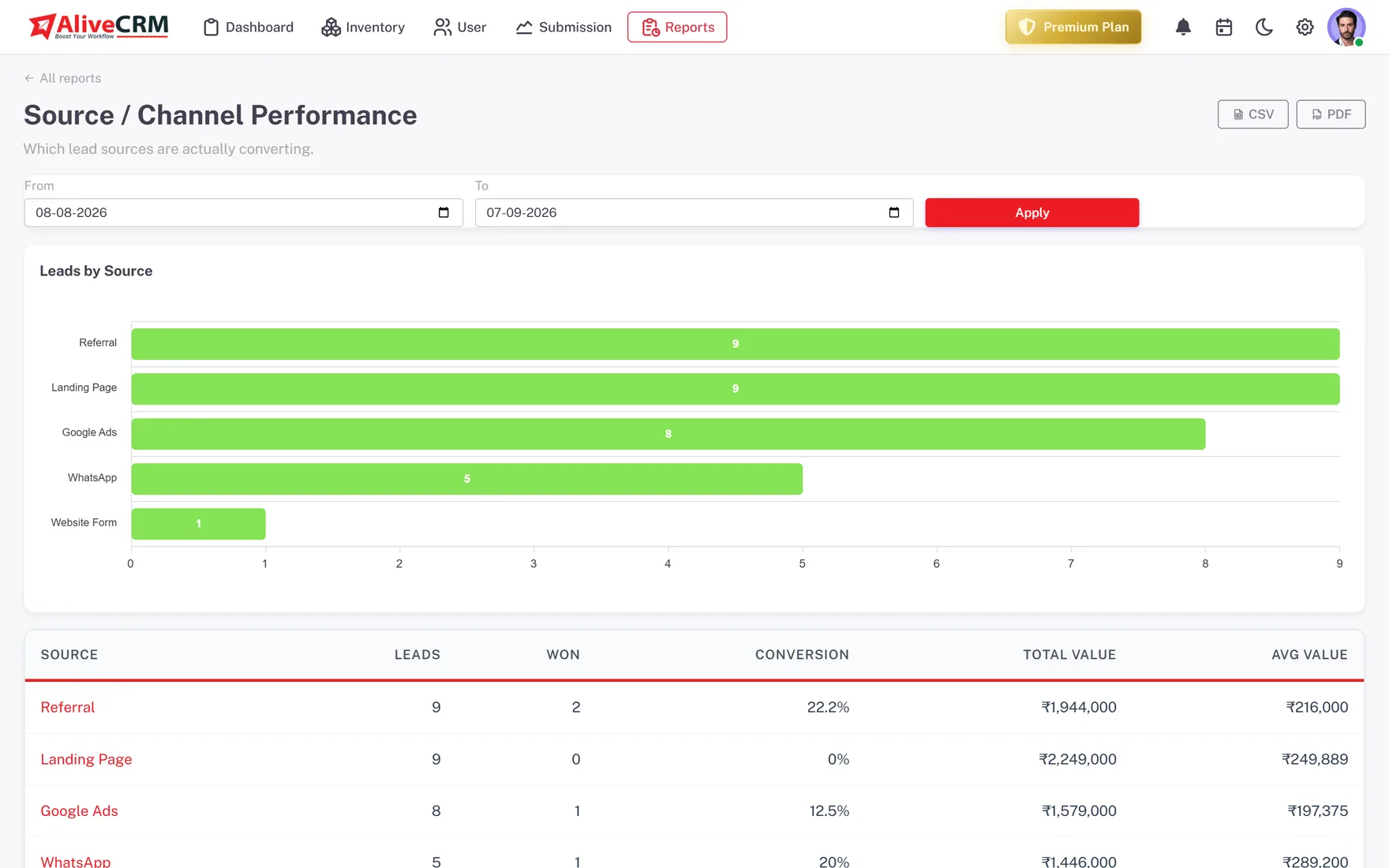
An example week
A Sales Manager's Week in AliveCRM
This is an illustration of how a manager of an eight-person sales team might use AliveCRM, not a customer story.
- Monday. The manager sets round-robin for website enquiries and least busy for imported event lists.
- Tuesday. One rep is on leave. The manager filters that rep's open leads and reassigns them to two colleagues.
- Wednesday. The dashboard shows a high overdue count for one rep. The manager checks Contact History and talks to them.
- Thursday. Sales Rep Performance shows one rep replying in a fraction of the team average. Their call opening becomes the team script.
- Friday. The weekly review uses the Conversion Funnel to find the stage where most deals stall.
Who It Is For
Sales Teams That Use AliveCRM
Sales managers
One screen to see who owns what, who is behind on follow-up and where the pipeline is stuck this week.
Inside sales teams
Inbound leads shared fairly across reps, each with a response timer and a clear next step on the lead.
Teams split by product or region
A sales team per product, project or service, so leads reach the reps who know what the buyer asked about.
Owners stepping back from sales
Founders handing selling to a team who still want to see results without asking for updates every day.
Honest limits
What AliveCRM Does Not Do for Sales Teams
AliveCRM has no built-in dialer or call recording, no sales targets or commission tracking, no email sequences and no territory management. Bulk reassignment is not available, so leads are reassigned one at a time. It suits teams working inbound leads, not large outbound call centres.
Run Your Sales Team From One Screen
Start a 7-day free trial, invite your reps and set your first assignment rule.
FAQ
Frequently Asked Questions
It depends on the plan. Each plan includes a set number of users, and you can see the limits on the pricing page. AliveCRM is built for teams of about 2 to 50 people, and every plan starts with a 7-day free trial so you can invite your reps before you pay.
Only if you want them to. Turn on "self only" for the sales rep role and each rep sees only the leads assigned to them. Managers and admins keep the full view. Roles also control who can edit, export or delete leads, so you decide exactly what each person can do.
The dashboard counts overdue reminders, and each lead shows its Contact History of calls and WhatsApp taps. On the Advance and Premium plans, the Follow-up Compliance report shows which reps keep their reminders on time, and Sales Rep Performance shows average response per rep.
Our sales CRM page covers the pipeline and selling itself: stages, deals and quotes. This page is about running the team: how leads are shared, who sees what, and how a manager checks follow-up and coaches from the reports. It is the same product.