Feature
CRM Reports That Answer Real Sales Questions
Nine reports built from the leads, statuses and reminders your team already records, with no queries to write and no spreadsheet to rebuild each month.
The short answer
What CRM reports does AliveCRM include?
AliveCRM includes nine CRM reports: lead pipeline, conversion funnel, source performance, form performance, sales rep performance, follow-up compliance, project, product catalog and user activity. The lead pipeline report is on every plan; the other eight come with the Advance and Premium plans. All are built from records your team already keeps.
Most CRM reporting fails in one of two ways: it needs an analyst to build it, or nobody trusts it because the data was never kept current. These reports sit close to the daily work, so the numbers are as fresh as the last status change.
Questions the reports answer
- How many leads came in, and how much are they worth?
- Which sources and forms bring leads that convert?
- Which rep is fastest to respond, and who is falling behind?
- At which stage do most leads drop out?
How It Works
From Daily Work to a Decision
No setup: the reports read what the team already records.
Pipeline
Pipeline and Conversion Funnel
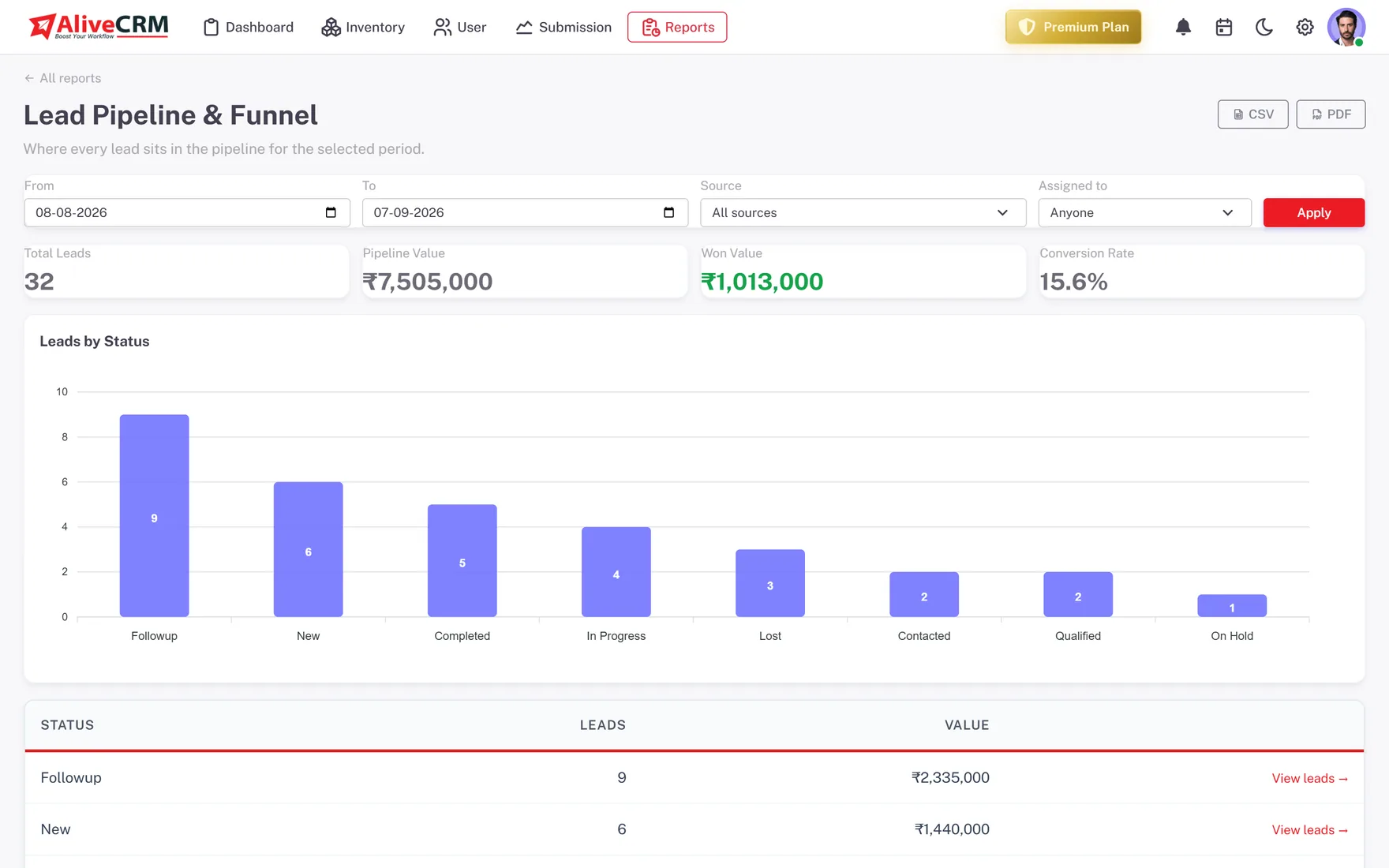
The lead pipeline report shows total leads, pipeline value, won value and conversion rate for the dates you pick, with a count and value per status. The conversion funnel adds stage-to-stage drop-off, calculated from real status-change history.
- Pipeline value and won value
- Count and value per status
- Funnel from real status changes
Channels
Source and Form Performance
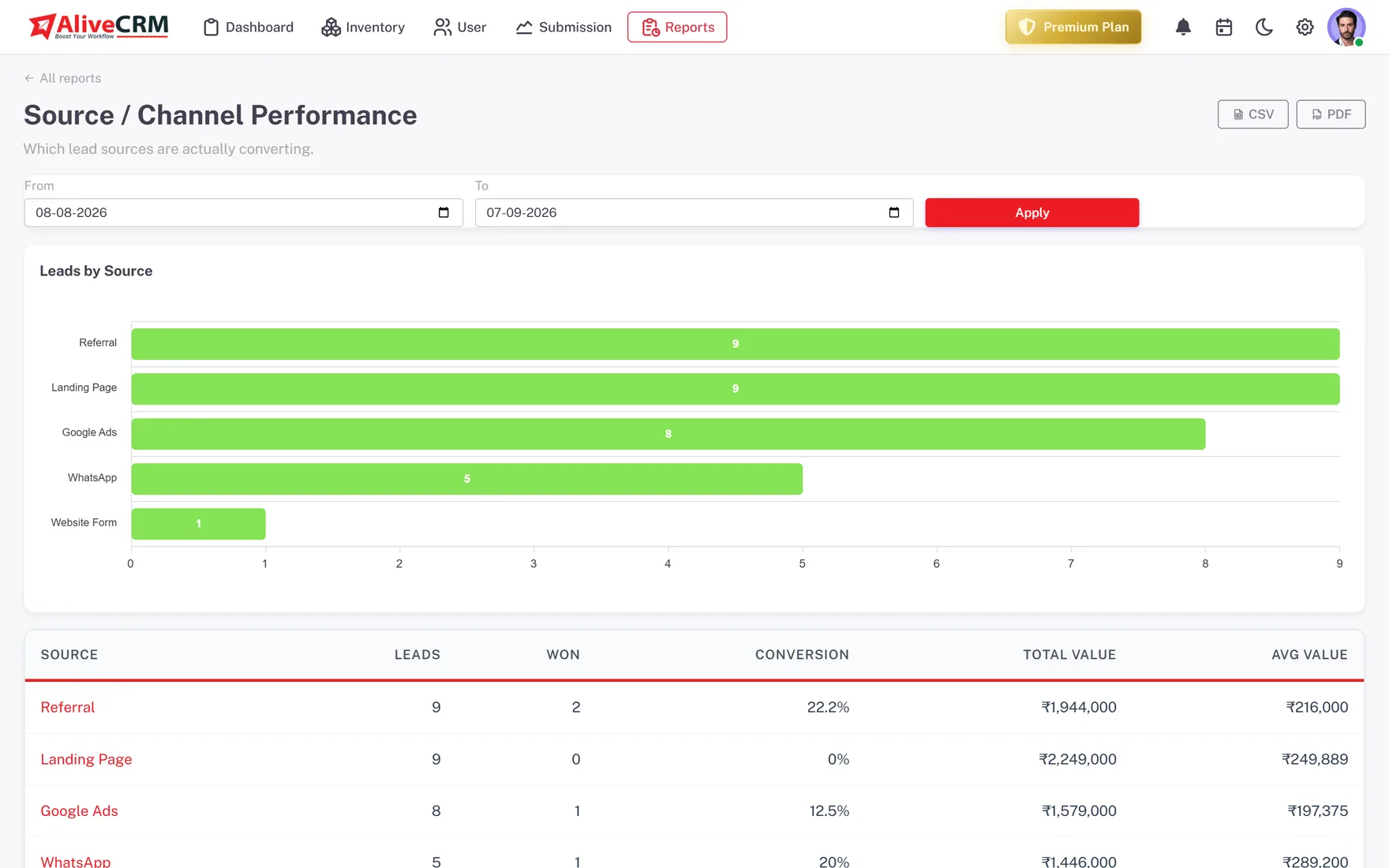
Source performance ranks every channel by lead volume, won count, conversion rate and value, so you can tell a busy channel from a paying one. Form performance shows submissions and converted leads for each lead capture form.
- Leads, won and conversion per source
- Total and average value per channel
- Submissions and conversion per form
Team
Rep Leaderboard and Follow-Up Compliance
The sales rep report ranks assigned leads, won count, won value, conversion and average response per person. Follow-up compliance shows how reliably each rep clears reminders before they go overdue, so a slipping habit shows up early.
- Won value and conversion per rep
- Average response per rep
- Reminders on time vs overdue
Rahul Sharma
Example Technologies
Catalog and Team
Projects, Catalog and User Activity
The project report shows each project with its status and lead count. The product catalog report lists orders or bookings per product and service. User activity shows when each team member last logged in and how many days ago that was.
- Lead count and status per project
- Orders or bookings per item
- Last login per user
Rahul Sharma
Example Technologies
Who It Is For
Who Reads These Reports
Business owners
See pipeline value, won value and the channels worth paying for, without waiting for someone to build a spreadsheet.
Sales managers
Use the rep leaderboard and follow-up compliance in weekly one-to-ones, and coach on habits rather than hunches.
Marketing leads
Compare sources and forms on conversion, not just volume, and move budget to the pages that bring real buyers.
Project and product heads
Check which projects, products or services draw enquiries and which need more attention from the sales team.
Honest limits
What the Reports Do Not Do
There is no custom report builder, no scheduled email reports and no AI forecasting. Reports show what your team recorded, so they are only as good as your statuses and sources. Export to CSV or PDF when you need to combine them with data from other tools.
See What Is Actually Converting
Start a 7-day free trial; the Lead Pipeline report works from your first lead.
FAQ
Frequently Asked Questions
No. The reports are built from your leads, statuses, sources and reminders, which AliveCRM records as your team works. Pick a report, set the date range and any filters, and it is ready. The one thing worth doing up front is flagging which statuses count as won and lost.
The lead pipeline report is on every plan. The other eight, including source, form and rep performance, follow-up compliance, conversion funnel, project, catalog and user activity, are on the Advance and Premium plans. The pricing page shows the current split.
Yes. The pipeline, source, sales rep, follow-up and form reports export to CSV and PDF. The project, catalog and user activity reports export to CSV, and the conversion funnel exports to PDF, which is handy for a board pack or a weekly sales meeting.
From the real status-change history on each lead, not a snapshot of where leads sit today. That means the stage-to-stage drop-off reflects how leads actually moved through your process. The biggest drop between two stages is usually the best place to start improving, whether that is slow quotes or missed follow-ups.
Yes. The pipeline, funnel, source, rep, follow-up and form reports take a from and to date, so you can look at a week, a month or a quarter, and some add a source or owner filter. The project report filters by status and the catalog by product or service.