Sales CRM
A Sales CRM Your Team Will Actually Use
AliveCRM is a sales CRM for teams of 2 to 50. Work every lead through your own pipeline, follow up on time and send the quote from the same record.
The short answer
What is a sales CRM?
A sales CRM is the tool a sales team uses to run its pipeline. It shows every open deal, its stage, its owner and the next step, and it reminds reps when that step is due. AliveCRM adds quotations and invoices, so a deal goes from enquiry to quote to invoice without leaving the CRM.
Large CRMs are built for large sales departments, with admins, custom objects and long setup projects. Small teams need something different: a pipeline that makes sense on day one and fewer clicks between a call and the next follow-up.
What makes a sales CRM worth using
- Reps see their own leads first, with the next step on each.
- Managers see the whole pipeline and who is behind.
- Quotes come from the lead record, not a separate tool.
- Reports answer real questions: how many, from where, and who closed.
How It Works
From Enquiry to Invoice
Every step happens on the same lead record.
Pipeline
Build a Pipeline That Matches How You Sell
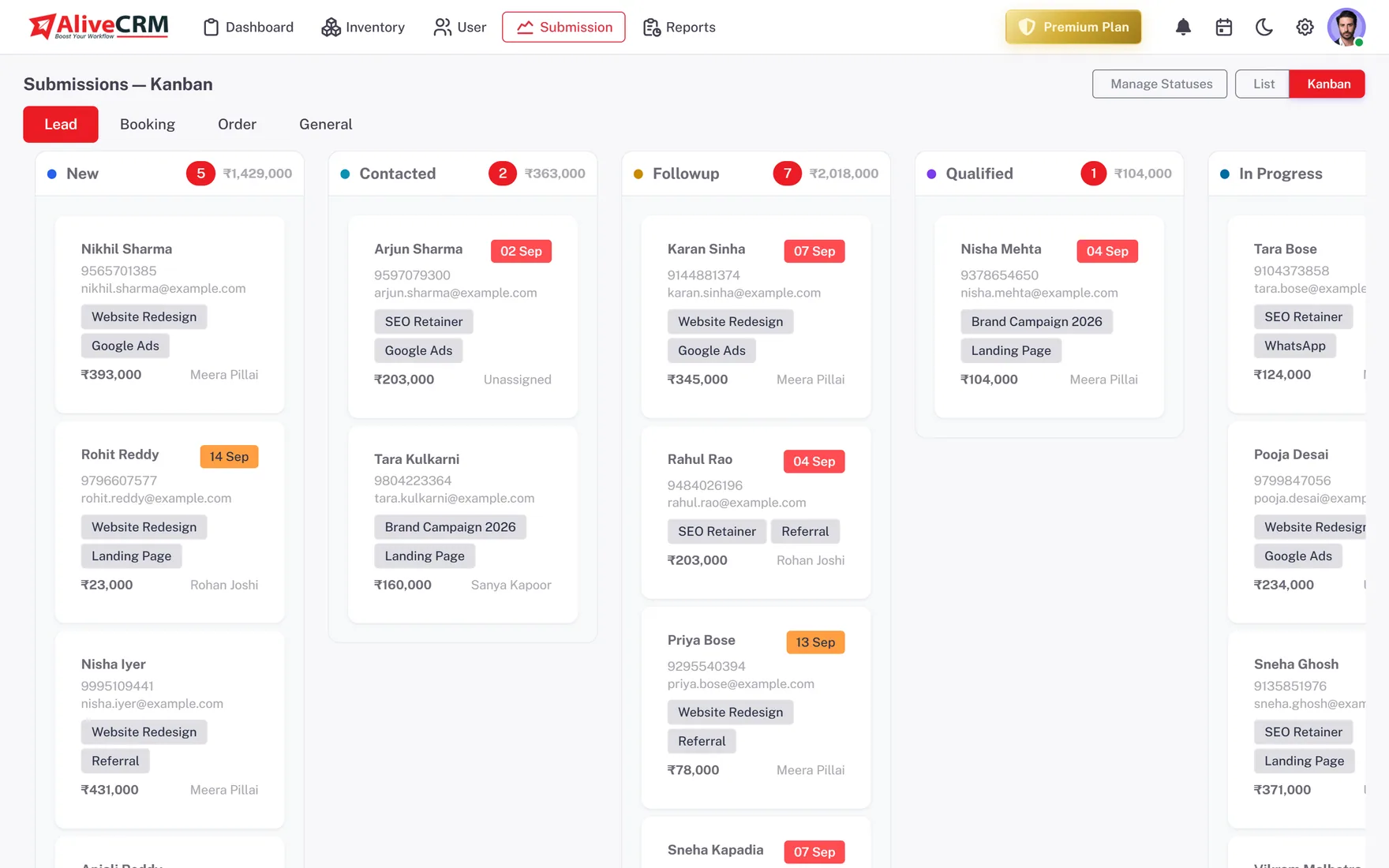
Name your own stages and move deals on a Kanban board that shows the count and total value in each column. Switch to the list view to filter by owner, source or status when you need a closer look.
- Custom stages
- Count and value per stage
- Kanban and list views
Ownership
Give Each Rep Clear Ownership
Each lead has one owner. Assign by hand or with auto-assignment rules (Basic plan and above), and use roles with "self only" visibility so reps see their own leads while managers see the whole team.
- Auto-assignment or manual assignment
- Roles and permissions
- "Self only" lead visibility
Rahul Sharma
Example Technologies
Quotes
Send Quotes and Invoices From the Deal
On Advance and Premium, create a quotation with line items and tax, download it as a PDF and convert it into an invoice when the client says yes. GST is supported for Indian businesses, and the quote stays linked to the lead it came from.
- Line items and tax, including GST
- PDF download
- Convert a quote into an invoice
Rahul Sharma
Example Technologies
Follow Up
Follow Up and Measure Results
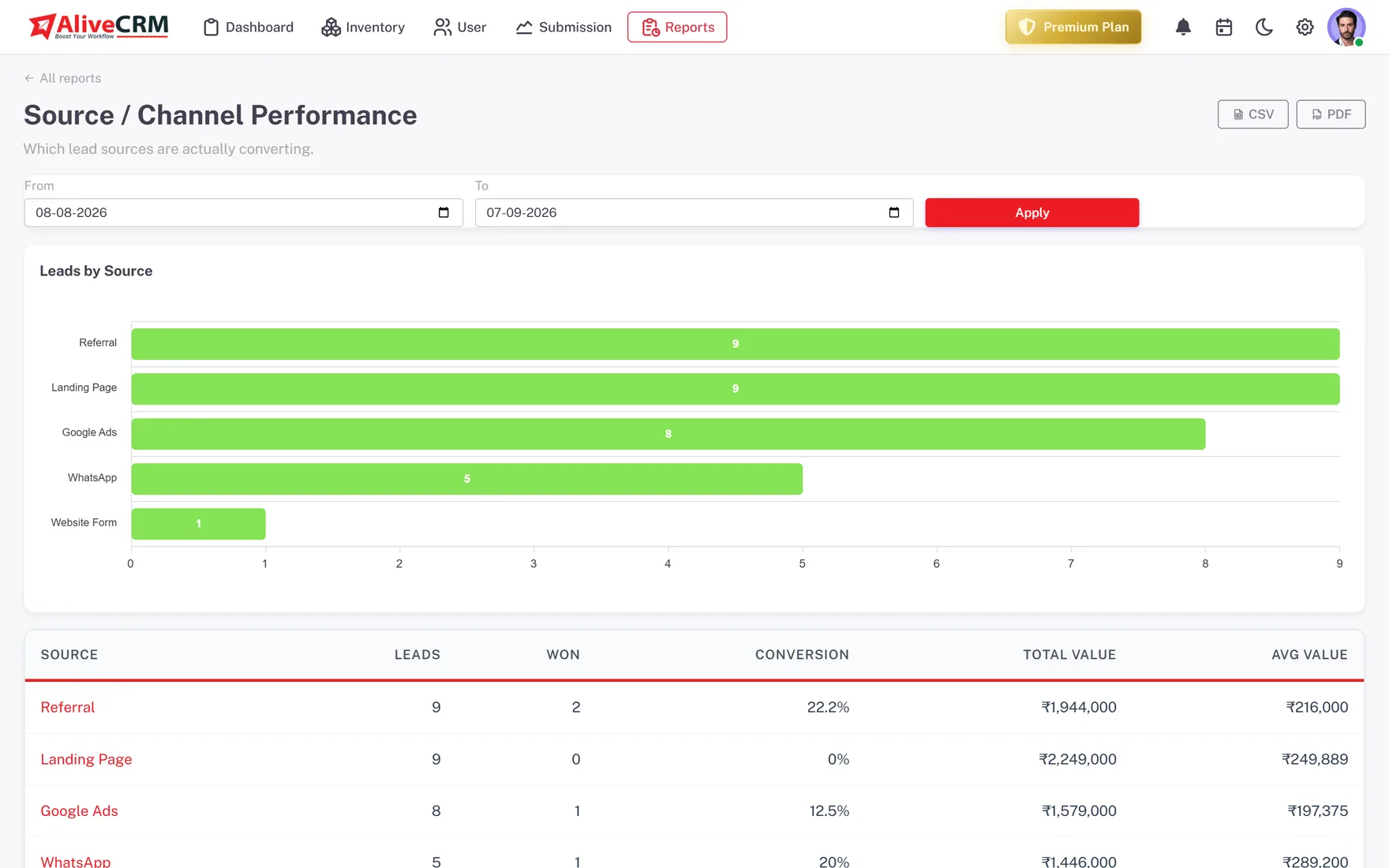
Set a reminder on each lead (Basic plan and above) and tap to call from the record (WhatsApp chat on Advance and Premium). The Lead Pipeline report is on every plan; Sales Rep Performance and Conversion Funnel come with Advance and Premium.
- Reminders and Contact History
- Lead Pipeline report on every plan
- Rep performance on Advance and Premium
Who It Is For
Who AliveCRM Is Built For
Founder-led sales
You still close most deals yourself. Keep every lead and quote in one place so nothing depends on your memory or your inbox.
Small sales teams
Two to ten reps sharing inbound leads, with a manager who needs to see who is behind on follow-ups each morning.
B2B service firms
Demo requests and project enquiries that need a proper quote before they close, often with several calls in between.
Teams leaving a big CRM
You pay for seats and modules nobody uses. You want a pipeline, reminders, quotes and simple reports, without an admin.
Honest limits
What AliveCRM Does Not Do
AliveCRM has no built-in dialer or call recording, no email sequences and no AI forecasting. Calls and WhatsApp open on your own phone, and each tap is logged on the lead. If your team lives on outbound calling or email automation, a dedicated tool will serve you better.
Give Your Sales Team One Pipeline
Start free, set up your stages and add your first leads.
FAQ
Frequently Asked Questions
A sales CRM helps reps work leads one by one: owners, stages, follow-ups and quotes. A marketing CRM focuses on campaigns, email lists and nurturing at scale. AliveCRM is a sales CRM. It captures leads from your forms, but it does not send bulk email campaigns.
Yes, on the Advance and Premium plans. The Sales Rep Performance report shows leads assigned and won per person, and the Follow-up Compliance report shows who keeps reminders on time. Every plan includes the Lead Pipeline report, which counts leads in each stage.
Yes, on the Advance and Premium plans. You build a quotation with line items and tax, download it as a PDF and convert it into an invoice once the client accepts. GST fields are supported for Indian businesses, and each invoice can be marked as paid or cancelled when the deal is done.
The free trial has one user. Paid plans add more seats, so a team can grow from a founder to a full sales team on the same account without moving data. The pricing page lists the exact user limit for each plan.
Yes. Export your leads from the old CRM as a CSV file and import them into AliveCRM, up to 2,000 rows per file. Set up your stages first so imported leads land in the right place. Check which columns map before you import, and keep the old export for reference.