Landing Page Leads
Landing Page Lead Management for Ad Campaigns
Put a separate AliveCRM form on each campaign landing page, reply to every paid click while it is still warm, and see which campaigns bring customers.
The short answer
What is landing page lead management?
Landing page lead management means every lead from a campaign landing page is captured with its campaign, given an owner, followed up quickly and counted against the campaign that produced it. AliveCRM does this with a separate form per landing page and reports that compare campaigns by leads won, not just leads received.
Paid campaigns cost money for every click. A lead that waits a day for a reply, or lands in a spreadsheet with no campaign name, wastes that spend and hides which ads actually work.
Where landing page leads come from
- Google and Microsoft search ads.
- Facebook, Instagram and LinkedIn ads that click through to your page.
- Email and SMS campaigns with a link to an offer.
- QR codes on print, events and signage.
How It Works
From Ad Click to Customer
The campaign stays on the lead from click to sale.
Build
A Form for Each Campaign
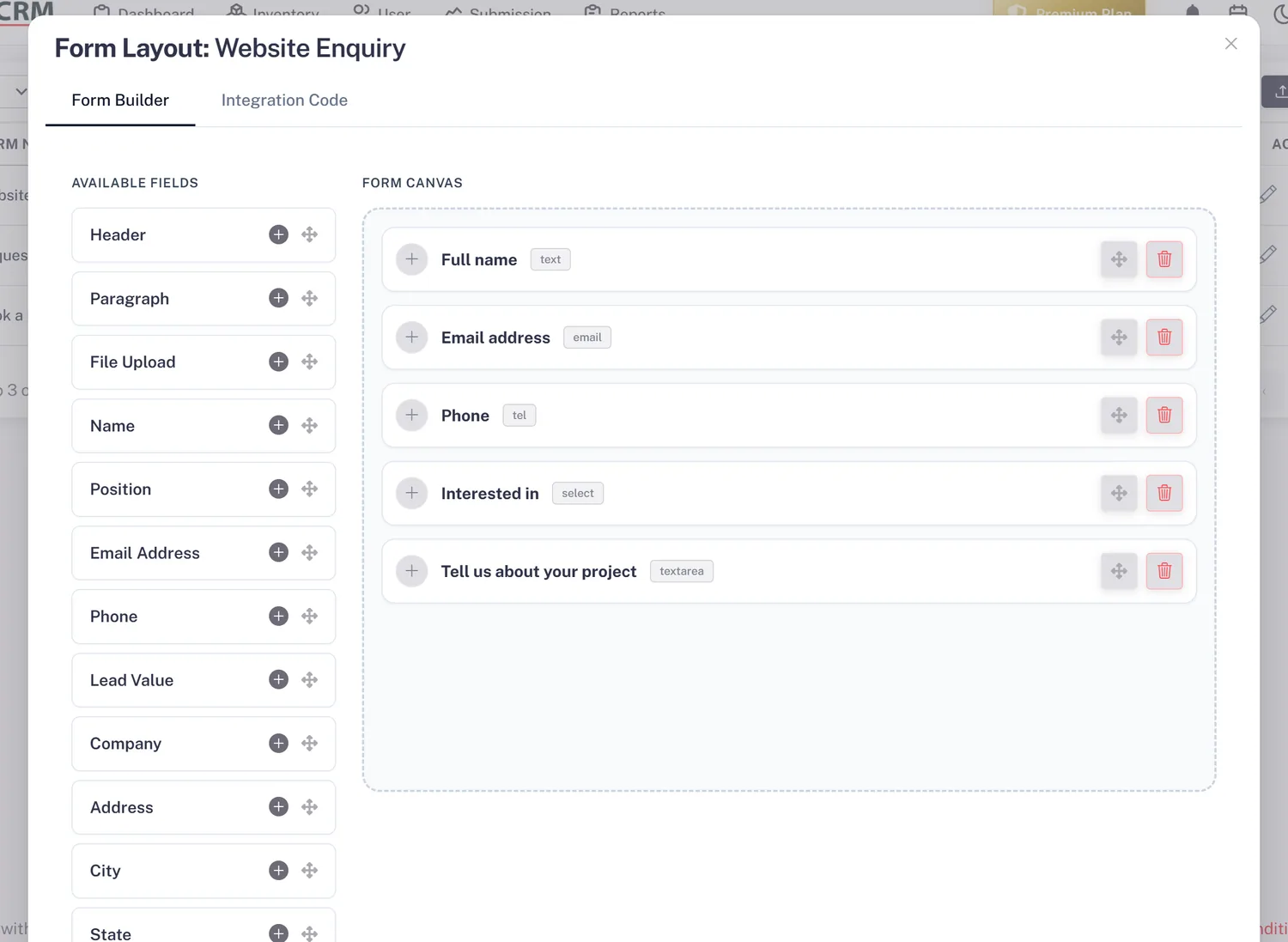
Build a short form for each campaign or offer in the form builder, with only the fields you need to qualify. Set a source on each form, such as the campaign name, so every lead from that page is tagged with the campaign it came from.
- A separate form per campaign
- A source set on each form
- Button text and colours to match the page
Embed
Works on Any Landing Page Builder
Paste one script tag into the page, whether it is built in WordPress, a page builder or your own code, or add it through Google Tag Manager. The landing page URL is recorded on every lead, so two pages using the same form still report apart.
- One script tag or GTM
- Page URL recorded on each lead
- No plugin needed for WordPress
Rahul Sharma
Example Technologies
Respond
Reply Before the Click Goes Cold
With auto-assignment on the Basic plan and above, each campaign lead goes straight to a team member. The response timer on the lead turns orange at 15 minutes and red at 30, and a reminder (Basic and above) keeps the second and third follow-up on time.
- Owner set on arrival
- Response timer on every lead
- Reminder for the next follow-up
Rahul Sharma
Example Technologies
Compare
See Which Campaigns Bring Customers
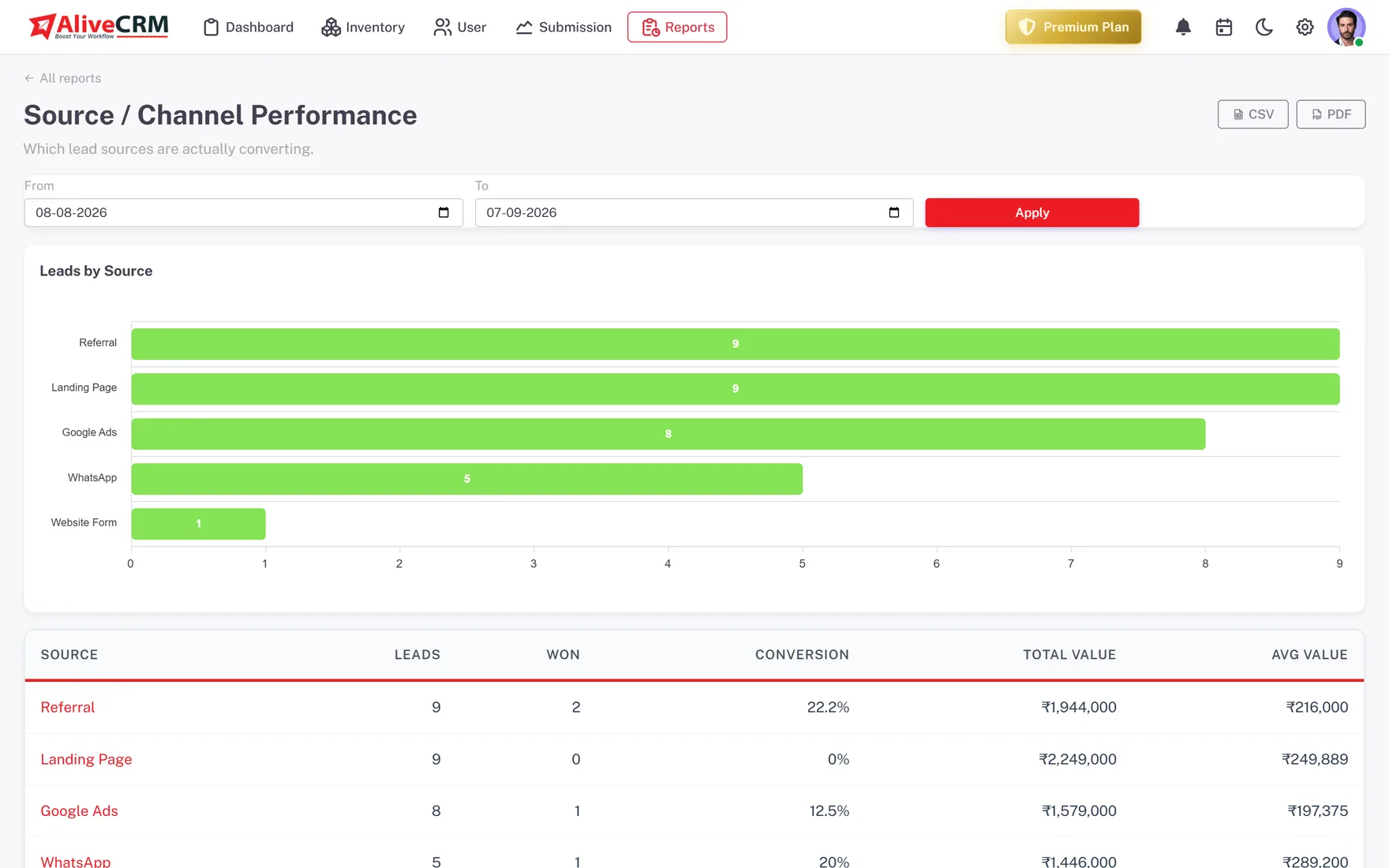
On Advance and Premium, the Source Performance report ranks campaigns by leads, won count and conversion, and Form Performance does the same for each landing page form. Use it to move budget to the campaigns that sell, not the ones that only fill forms.
- Won count per campaign
- Conversion per landing page form
- Lead Pipeline report on every plan
An example campaign
One Campaign, From Launch to Review
This is an illustration of how a small business running two ad campaigns might use AliveCRM, not a customer story.
- Monday. The marketer builds two forms, "Search ad, free quote" and "Social ad, offer", and embeds each on its own landing page.
- Monday afternoon. Leads start arriving, tagged with their campaign, and auto-assignment shares them across two sales reps.
- Tuesday. A rep sees a red timer on a lead from the night before, calls first thing and sets a reminder for Friday.
- Friday. Reminders fire for the week's leads that have not answered, and each gets a second call.
- Month end. Source Performance shows the search campaign won more customers from fewer leads, so budget moves there.
Who It Is For
Teams That Run Campaigns Into AliveCRM
Businesses running paid ads
Search and social campaigns sending clicks to landing pages, where every lead needs an owner before the ad spend is wasted.
Agencies running client campaigns
A form per client campaign, with leads reaching the right sales team and reports that show which ads bring customers.
Seasonal and launch campaigns
Admission seasons, property launches and sales events, where a burst of leads must be shared fairly and answered fast.
Marketers who report to sales
A clear link from campaign to won customer, so the budget conversation is about sales, not cost per form fill.
Honest limits
What AliveCRM Does Not Do for Campaigns
AliveCRM does not build landing pages, run or manage ads, or pull lead forms directly from Facebook or Google lead ads. It does not track ad spend or cost per lead. Your form lives on your own landing page, and AliveCRM handles every lead it produces from that point on.
Make Every Paid Click Count
Start a 7-day free trial and put a form on your next campaign landing page.
FAQ
Frequently Asked Questions
Yes. Give each campaign its own form and set its source, and every lead from that form carries the campaign. The landing page URL is recorded too. On the Advance and Premium plans, Source Performance and Form Performance compare campaigns by leads, won count and conversion.
Not directly. There is no automatic sync with Facebook lead ads or Google lead form extensions today. Send your ads to a landing page with an AliveCRM form instead, or export lead ad results as a CSV file and import them, up to 2,000 rows per file.
No. Copy the embed code from AliveCRM and paste it into your landing page builder wherever it accepts custom HTML or a script, or add it through Google Tag Manager. On WordPress you can paste it into a block without installing a plugin.
No. AliveCRM does not import ad spend, so it cannot calculate cost per lead or return on ad spend. It shows leads, won count and conversion per campaign, which you can set against the spend figures from your ad platform to work out cost per customer.