CRM Software
CRM Software That Keeps Every Lead Moving
AliveCRM is CRM software for teams of 2 to 50. Capture leads from your website, give each one an owner and follow up on time, all from one shared list.
The short answer
What does CRM software do?
CRM software keeps every lead and customer in one shared list, shows who owns each one and reminds the team what to do next. AliveCRM adds a form builder, so enquiries from your website land in the CRM as leads, ready to assign and follow up, with no copying from an inbox.
Most small teams start with a spreadsheet, a shared inbox and a WhatsApp group. That works until two people call the same lead, or nobody calls at all. CRM software fixes this by giving every enquiry one record, one owner and one next step.
Signs your team has outgrown a spreadsheet
- Leads sit in an inbox for a day before anyone replies.
- Two reps call the same person about the same enquiry.
- Nobody can say how many enquiries came in last month, or from where.
- Follow-ups depend on someone remembering.
- A rep leaves, and their leads leave with them.
How It Works
How AliveCRM Works, in Four Steps
From the first enquiry to a won deal, each step happens on the same lead record.
Capture
Capture Leads From Your Website and Beyond
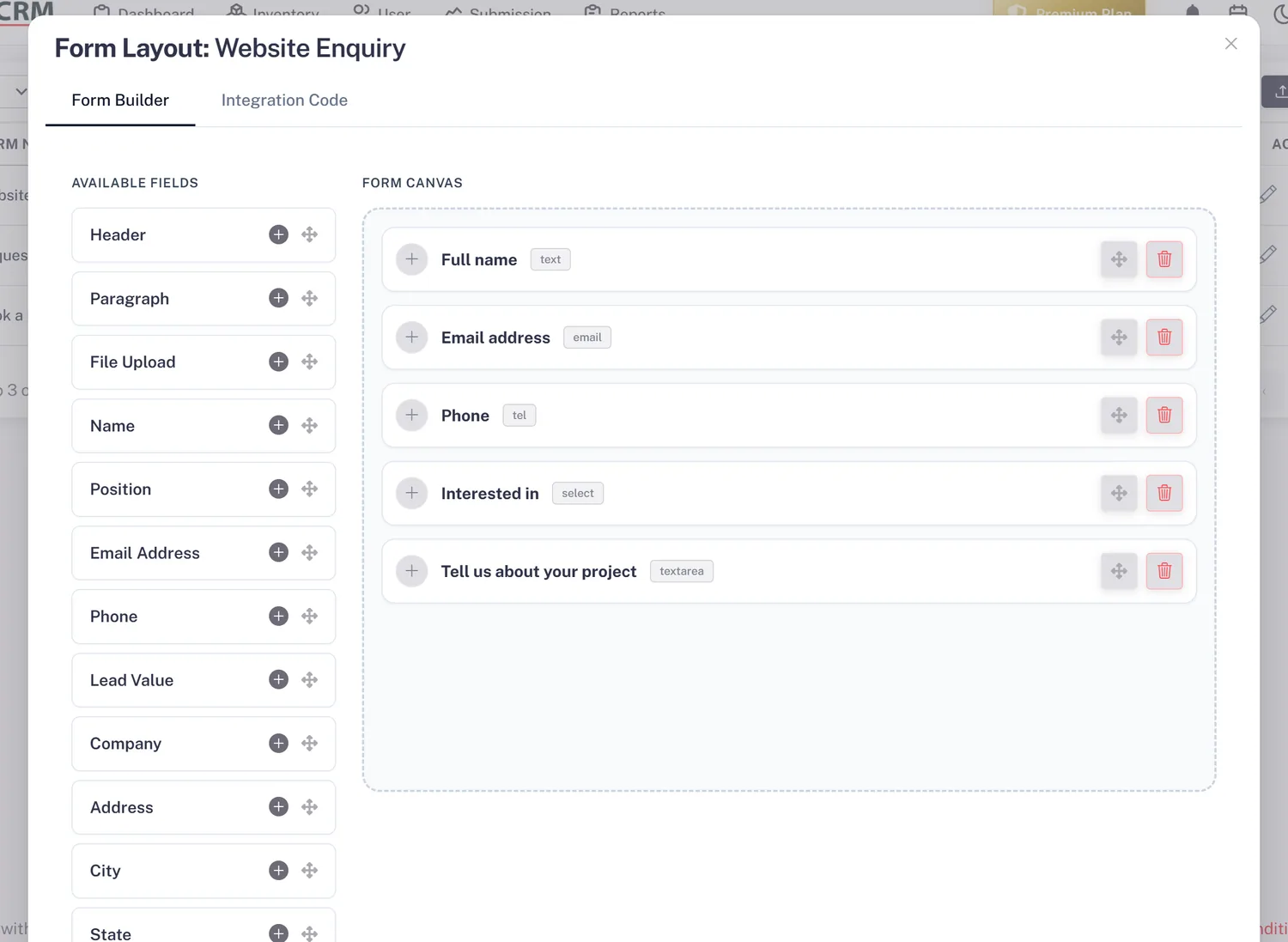
Build a form in the form builder and embed it with one script tag, through Google Tag Manager or on WordPress. Each submission becomes a lead with its source and page recorded. You can also add leads by hand or import a CSV file.
- Form builder with no coding
- Embed with a script tag, GTM or WordPress
- CSV import, up to 2,000 rows per file
Organize
Keep Every Lead on One Record
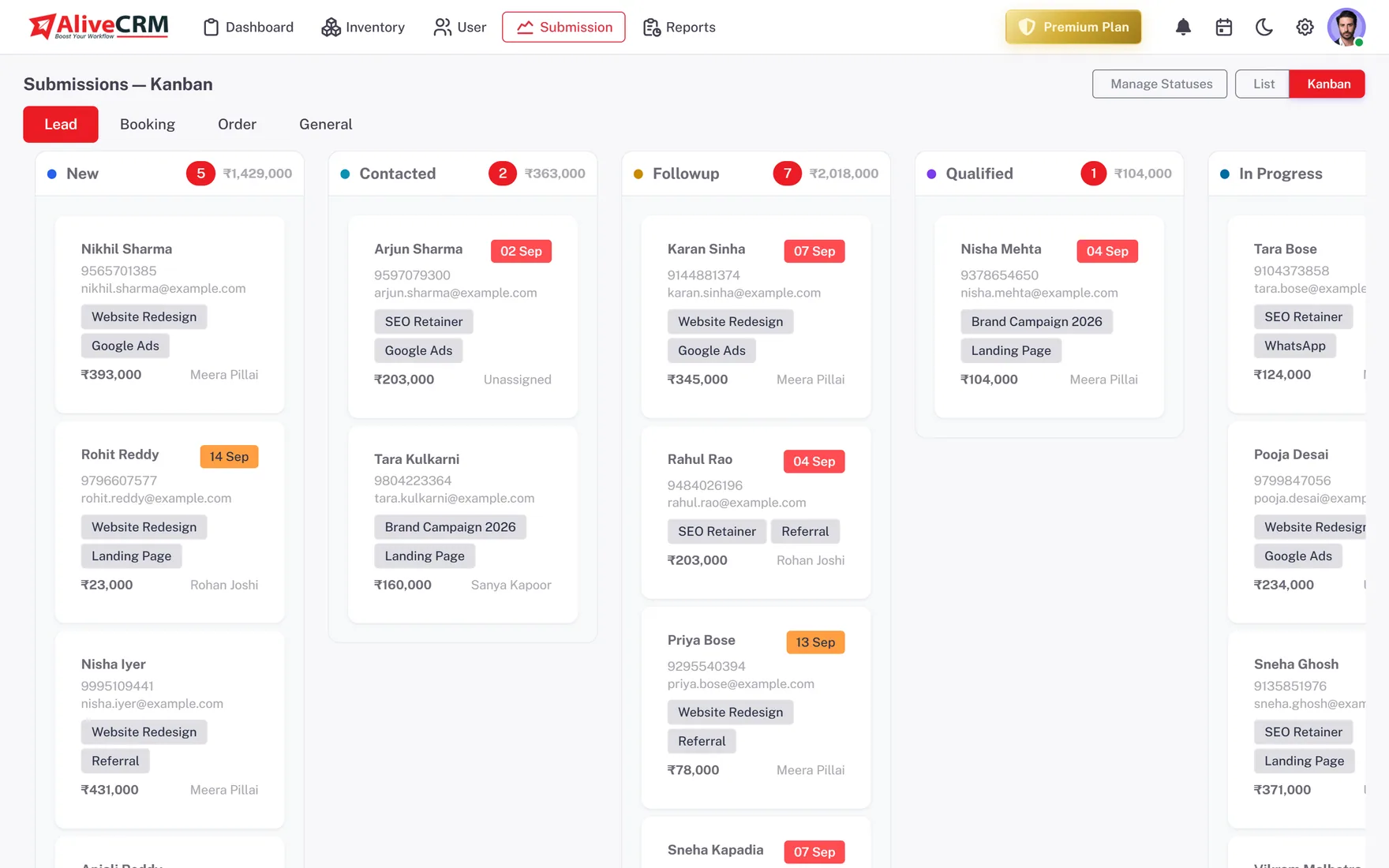
Each lead holds its source, status, owner, notes and status history. Set your own statuses, sort leads into nested categories, and link each lead to the product, project or service it came from.
- Custom statuses and nested categories
- Notes and full status history
- Leads linked to products, projects or services
Assign
Give Every Lead an Owner
Assign leads by hand, or turn on auto-assignment rules for each submission type: round-robin, least busy, balanced, random or a fixed owner (Basic plan and above). With rules off, new web leads go to the company admin to assign.
- Round-robin, least busy, balanced, random or fixed
- Reassign when someone is away
- Roles and "self only" visibility per user
Rahul Sharma
Example Technologies
Follow Up
Follow Up Before the Lead Goes Cold
Set a reminder with a date, time and note on each lead (Basic plan and above). Tap to call from the lead, or WhatsApp on Advance and Premium, and every tap is saved to its Contact History. Overdue reminders show as a count on the dashboard.
- A reminder on every lead
- Tap-to-call with Contact History
- Overdue count on the dashboard
Rahul Sharma
Example Technologies
Who It Is For
Who Uses AliveCRM
Real estate teams
Link each enquiry to a project, schedule site visits with guests and see which project brings in the most leads.
Digital agencies
Capture project briefs from your website, assign them to the right account lead and send a quotation from the same record.
Service businesses
Turn booking and quote requests into leads, follow up quickly, then convert the accepted quote into an invoice.
Education and coaching
Track admission enquiries by course, assign counsellors and remind them to call back before a student picks another institute.
Honest limits
What AliveCRM Does Not Do
AliveCRM is built around leads, follow-ups and quotes. It does not send email marketing campaigns, run a phone dialer or score leads with AI, and it has no Zapier connection or public API today. If those are core to how you sell, a larger suite may suit you better. If enquiries keep slipping through the cracks, start here.
Try AliveCRM Free
Start a 7-day free trial, build your first form and invite your team when you are ready.
FAQ
Frequently Asked Questions
CRM stands for customer relationship management. CRM software is a shared system where a team keeps every lead and customer, records each conversation and sets the next step. The aim is simple: no enquiry is forgotten, and anyone on the team can see where a deal stands without asking around.
You can try it free for 7 days, with no payment at signup. The trial runs on the Free plan: one user, one project, one form and up to 25 leads per form. After the trial you choose a paid plan, which adds users, forms, auto-assignment and reminders. Prices show in USD, or INR in India.
Most of the work is building one form and pasting its embed code onto your site. A guided setup wizard walks you through your company details, your first form and inviting users. There is no data model to design first, so a small team can start working leads on day one.
Yes. Save your sheet as a CSV file and import it into AliveCRM. Each file can hold up to 2,000 rows, so a larger list goes in a few batches. Imported leads sit in the same list as website leads, with the same statuses, owners and reminders.
Yes. Indian accounts see prices in INR and can pay through Razorpay or Cashfree. On Advance and Premium, quotations and invoices support GST on each line item, and you can convert an accepted quote into an invoice and download it as a PDF. Teams elsewhere see USD pricing.